
Your wallet opens, but the application asks for Polygon and the balance you expected isn't there. You search for “add polygon to metamask” and find instructions that disagree about RPC addresses or still call the gas token MATIC. The useful answer starts with the network identity: Polygon PoS mainnet uses chain ID 137 and native POL. Then you can configure the wallet without accepting a stranger's settings.
Adding a network doesn't move money. It changes which blockchain your wallet reads and uses for transactions. That distinction prevents a lot of needless panic over an empty balance.
DefiPlay is a blockchain casino whose games use Polygon and process each bet or spin as a public blockchain transaction. Its wallet-based crypto casino model explains why the selected network matters: an application and your wallet must agree on the chain. Network setup is separate from deciding to gamble, and you can complete it without placing a bet.
Check Polygon PoS before you copy any settings
A search result labelled “Polygon” isn't enough. Say you copy a tutorial's settings, save them, and discover that it describes a test network. The wallet may accept the configuration, but it won't show your mainnet assets.
The independent ethereum-lists/chains community registry, checked for this 2026 guide, records Polygon Mainnet with chain ID 137, native currency POL, and 18 decimals.1 This guide means Polygon PoS mainnet, not another network carrying the Polygon name.
These are the fields to compare with that registry:
- Network name:
Polygon Mainnet. This is a readable label, not proof of identity. - Chain ID:
137, entered as a decimal number in the manual form. - Currency symbol:
POL. - RPC URL: an HTTPS address from the registry, for example
https://polygon-bor-rpc.publicnode.com. - Block explorer URL:
https://polygonscan.com, which the registry lists as an explorer.
The RPC address is a remote procedure call endpoint: a server your wallet asks for blockchain data and uses to submit signed transactions. The example above is a registry-listed option, not an endorsement or uptime guarantee. Availability and listings can change, so compare it with the source before saving.
Why care about the chain ID? Vitalik Buterin's EIP-155 (2016) includes the chain ID in transaction signing to provide replay protection between chains with different IDs; it lists Ethereum mainnet as 1.2 Polygon's 137 identifies a different signing context. A familiar network name can't replace that check.
How to add polygon to metamask from the wallet
The awkward part is often finding the right control. You might have a phone tutorial beside a browser extension whose menus look different. Labels change between releases, so follow the function of each screen rather than its position in a screenshot.
If you haven't installed the wallet, start with the MetaMask installation guide. If it's already installed, you don't need to create another wallet or import your recovery phrase to add a network.
- Open MetaMask directly. Use your installed extension or mobile app rather than a wallet-shaped window on a website.
- Open network management. Look for the network selector or All networks, then Manage networks. Some versions put network controls in Settings under Networks.
- Look for Polygon first. If Polygon Mainnet is available in the supported network list, add or enable it there. If it's already enabled, select it rather than adding a duplicate.
- Use the custom-network form if needed. Look for Add a custom network or Add a network manually, then enter the verified fields above. Compare the entire RPC hostname, not just the word “polygon”.
- Save, then select Polygon. Return to the network controls and confirm that Polygon PoS is selected for the application you intend to use.
Saving and selecting are separate actions. EIP-3085 (2020), the add-chain proposal, expressly warns that a successful add request must not be assumed to select the chain automatically.3 That's why the last step matters even after you see a success message.
Adding or selecting a network is a local configuration change, so it doesn't itself require a blockchain gas payment. A request to transfer funds or grant token spending permission is a separate action. You can reject it and still finish network setup.

Verify the RPC without treating chain ID as a certificate
A fake configuration can copy the right name and symbol. For example, a message offers a “faster Polygon RPC” and includes chain ID 137, but the server belongs to someone you don't know. Matching the number doesn't make that server honest.
Compare the proposed endpoint with the registry through a separately opened bookmark or known source. You can read its network data without connecting a wallet. Avoid RPC addresses copied only from advertisements, private messages, or search snippets.
For readers checking raw network data, 137 in decimal equals 0x89 in hexadecimal. EIP-3085 (2020) specifies hexadecimal chain IDs in programmatic add-chain requests and requires a wallet to reject an endpoint whose eth_chainId result doesn't match the submitted ID.3 Your manual form generally wants 137; a developer-facing response may show 0x89.
But an untrusted server can claim the correct ID. This check catches a mismatch, not every deception. The same proposal warns that endpoints cannot be assumed honest and that RPC providers can see your IP address and on-chain activity. HTTPS protects the connection in transit; it doesn't establish the operator's intentions.
A sensible default is the wallet's built-in Polygon connection. If you need a replacement, use independently checked metadata and review the provider's privacy terms. Don't bypass a warning because a tutorial says to.
A network change also doesn't certify the application you connect afterward. The self-custody wallet explainer covers the separate responsibility for keys and signing. That responsibility remains after you add polygon to metamask successfully.
Why does the wallet still say MATIC?
An old label can make a genuine balance look wrong. Say your saved Polygon network shows MATIC while a newer guide says POL. Changing networks again or sending tokens to a “migration helper” would be the wrong response to a display problem.
Wikipedia's Polygon entry, checked in 2026, identifies the native token as POL and records its previous name as MATIC.5 The community registry agrees: its Polygon native-currency name and symbol are POL.1 Use POL in a new network configuration.
If an existing entry still displays MATIC, inspect the network settings before doing anything with funds. A currency symbol is metadata. Editing it doesn't send a transaction, change ownership, or convert tokens held elsewhere.
The native MATIC balance on Polygon PoS was upgraded automatically in the migration; a stale label doesn't require a separate claim transaction. MATIC held as an ERC-20 token on Ethereum is a different situation. This network-setup guide doesn't perform that migration, and changing a symbol cannot do it.
A “migration support” page asking for your recovery phrase is a reason to stop. Ethereum.org's security guidance, checked in 2026, explains that anyone holding that phrase can access your accounts and assets.7 Network configuration needs public settings, never your secret keys.
Get native POL on Polygon before you need gas
You can have assets and still lack the token needed for fees. Say you select Polygon and see a token balance, but a standard transaction fails because your native POL balance is empty. Holding an ERC-20 token doesn't automatically provide native gas.
For a small gas top-up, a direct transfer of native POL on Polygon PoS from a person you trust is straightforward. Copy your receiving address from the selected account, confirm the sender's network, and check the full address before sending. The sender pays the fee for that transfer; the receiver doesn't need gas merely to receive native POL.
If you already use an exchange or purchase service, check that its withdrawal route explicitly supports Polygon PoS and native POL. Review its minimum withdrawal and fee before buying. A small purchase can be an expensive top-up if the service's charge absorbs much of it. No particular provider is recommended here.
Bridging is another route, but it's a separate transaction process. Ethereum.org's bridges guide, checked in 2026, explains that blockchains operate in separate environments and that bridges carry smart-contract and operational risks.8 Check source-chain gas, destination-chain gas, the asset delivered, and all fees. For a tiny top-up, the extra steps may not be worth it.
Testnet faucet tokens cannot pay Polygon mainnet fees. The mainnet registry entry lists an empty faucet array; that doesn't prove every gas-assistance service is fraudulent.1 Still, an unfamiliar “free POL” page demanding a secret, upfront payment, or unrelated approval isn't a shortcut worth taking.
Calculate a gas reserve instead of guessing
A balance can look sufficient until fees are included. Say you hold 0.02 POL and want to send 0.01 POL. The transfer amount isn't the full amount the sender needs.
Ethereum.org's gas documentation, checked in 2026, gives the calculation as gas used multiplied by the price per unit. Its ordinary ETH-transfer example uses 21,000 gas, and it defines a gwei as one billion wei.6 Polygon's registry specifies 18 native-currency decimals, so a gas price of one billion base units corresponds to 0.000000001 POL.1
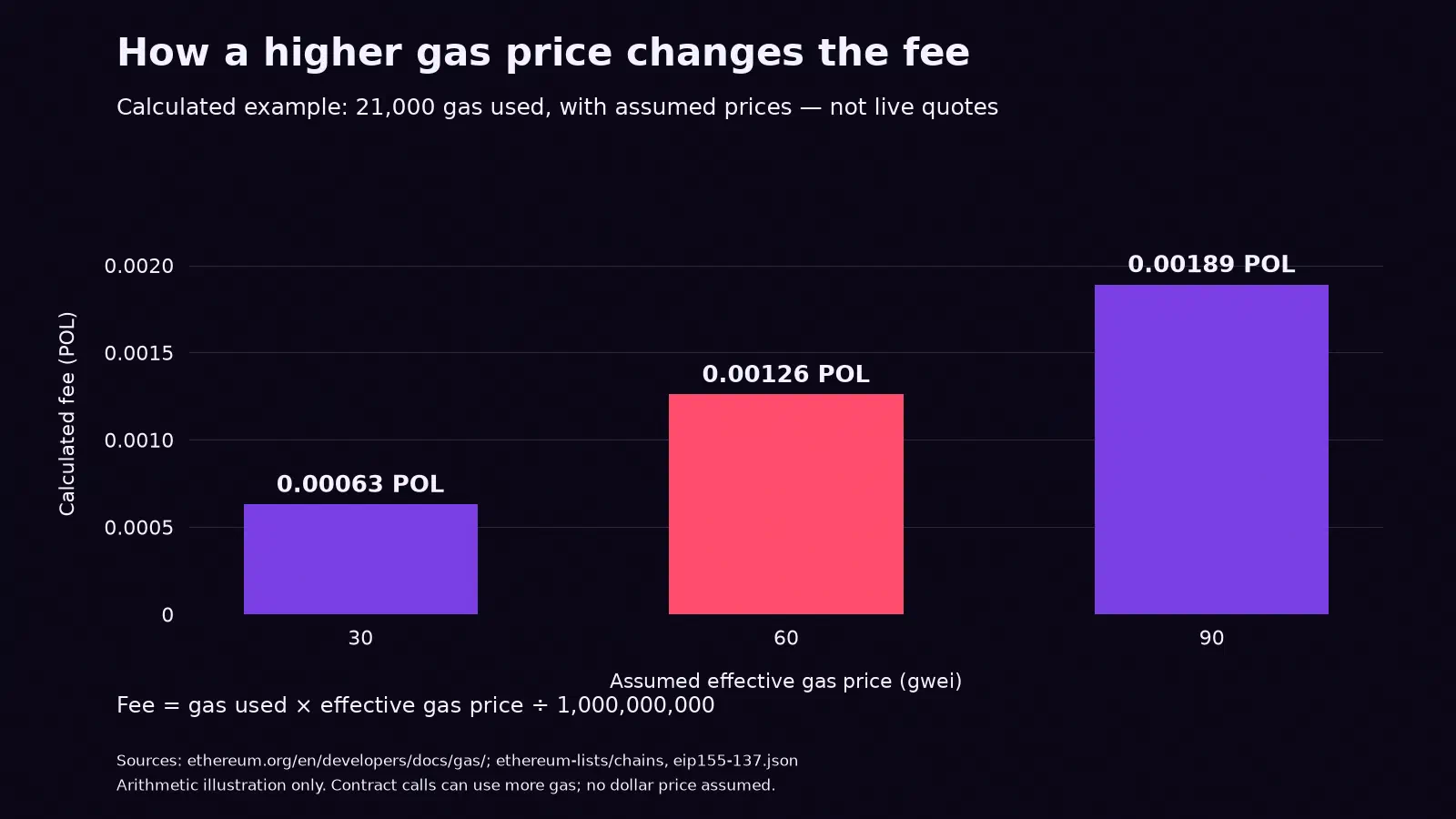
For a worked arithmetic example, assume a plain native transfer uses 21,000 gas and an effective price of 30 gwei. These are example inputs, not a live Polygon quote or a recommended price:
Fee = 21,000 × 30 ÷ 1,000,000,000 = 0.00063 POL
The sender would need 0.01063 POL for the transfer plus that fee. Starting from 0.02 POL leaves 0.00937 POL. Those figures are calculated, not a promise about the next transaction.
The chart varies only the assumed price while holding gas usage fixed. It shows why yesterday's reserve can become insufficient without any change in the amount sent.
A contract call can use more gas than a plain transfer, so this example doesn't estimate roulette or slot fees. Use the wallet's estimate for your actual action and leave room for its displayed maximum fee. The Polygon gas-fee guide covers fee mechanics in more detail.
Don't reduce the gas limit merely to make a quote smaller. Ethereum.org distinguishes pre-inclusion rejection from a transaction that runs out of gas during execution: the latter can consume gas even though its state changes revert.6
A zero balance needs checks, not a new wallet
An empty screen after setup can feel like a loss. Say POL appears on your browser extension but not your phone. Check the selected account and network on each device before trying a recovery procedure.
Adding a network on one device may not add it on another. Compare their settings. If the account and chain match, check the relevant transaction and recipient through the registry-listed explorer. A confirmed transfer to your address suggests a display or RPC problem rather than a need to send the funds again.
A website may also keep asking you to switch. EIP-3326 (2021) describes a separate request for changing the active chain and recommends a confirmation identifying the requester and destination.4 Check that request in the wallet. If it contradicts the application's expected network, don't approve it reflexively.
For interface help, use the wallet help center. Reinstalling shouldn't be the first response to a slow connection, and sharing your recovery phrase isn't troubleshooting.
Verified Polygon settings come before funding or signing
The expensive mistake is rushing past setup because a page promises to fix everything. If you're about to add polygon to metamask through an unsolicited prompt, pause and compare its fields with the independent registry instead.
Finish with Polygon PoS selected, chain ID 137 confirmed, and a checked RPC connection. Then verify that any funds you receive are native POL on Polygon PoS, with a reserve based on your actual transaction estimate.
For gambling, that reserve is a fee budget, not a reason to spend your whole wallet balance. Set a separate loss limit and use the responsible-gambling guidance. A verified network helps prevent avoidable setup errors; it doesn't make a bet safer financially.
Frequently asked questions
What network details do I need to add Polygon to MetaMask?
For Polygon PoS mainnet, use chain ID 137 and POL as the native currency symbol. Choose an HTTPS RPC endpoint listed in the community-maintained ethereum-lists/chains registry and compare every field before saving. The network name is a display label, so it cannot prove that the connection is genuine.
Does Polygon use MATIC or POL for gas?
Polygon PoS uses POL as its native gas token after the MATIC-to-POL migration. An older wallet configuration may still show the MATIC label. Changing that label does not transfer funds or migrate MATIC held on another blockchain.
Does adding Polygon to MetaMask cost money?
Adding or selecting a network is a wallet configuration change, not an on-chain transaction. It does not itself require a gas payment. Sending assets or interacting with a contract afterward can require native POL for fees.
Why does my Polygon balance show zero in MetaMask?
Check that you selected Polygon PoS and the correct wallet account. Assets held on Ethereum do not move to Polygon when you switch networks. If a confirmed Polygon transfer exists but your wallet still shows zero, compare the recipient address and check whether the RPC connection is responding.
Can I use a Polygon faucet for mainnet gas?
Testnet faucet tokens cannot pay mainnet fees. The Polygon mainnet entry in ethereum-lists/chains lists no faucets, which is not proof that every mainnet gas assistance service is fraudulent. Be cautious of free-gas offers that ask for a recovery phrase, payment, or unrelated spending approval.
Sources
- ethereum-lists/chains, Polygon Mainnet metadata, living registry
- Vitalik Buterin, EIP-155: Simple replay attack protection, 2016
- Ethereum Improvement Proposals, EIP-3085: wallet_addEthereumChain, 2020
- Ethereum Improvement Proposals, EIP-3326: Wallet Switch Ethereum Chain, 2021
- Wikipedia, Polygon blockchain, living reference
- Ethereum.org, Gas and fees, living documentation
- Ethereum.org, Ethereum security and scam prevention, living documentation
- Ethereum.org, Blockchain bridges, living documentation